

We’re happy to announce that VPN Exceptions (Split Tunneling) is now available in Seed4.Me VPN for iPhone!
This App Exclusions feature lets you keep local apps and services connected directly to the internet while routing all other traffic through your VPN.
You can access banking apps, online shopping platforms, and local websites without routing their traffic through a VPN server or disconnecting your VPN.
With Split Tunneling, you get more flexibility and control, choosing when to use the VPN connection and when to connect directly.
📱 Availability: This feature is now available on iPhone. It will be available soon for Android!
How to Enable App Exceptions on Seed4.Me VPN
- Update Seed4.Me VPN to the latest version via Google Play, AppStore or our website here: Seed4.me VPN.
- Open the app and go to Menu (☰) → Exceptions.
- Select the country whose local apps and services you want to access directly. If it appears at the top of the list, it has been selected.
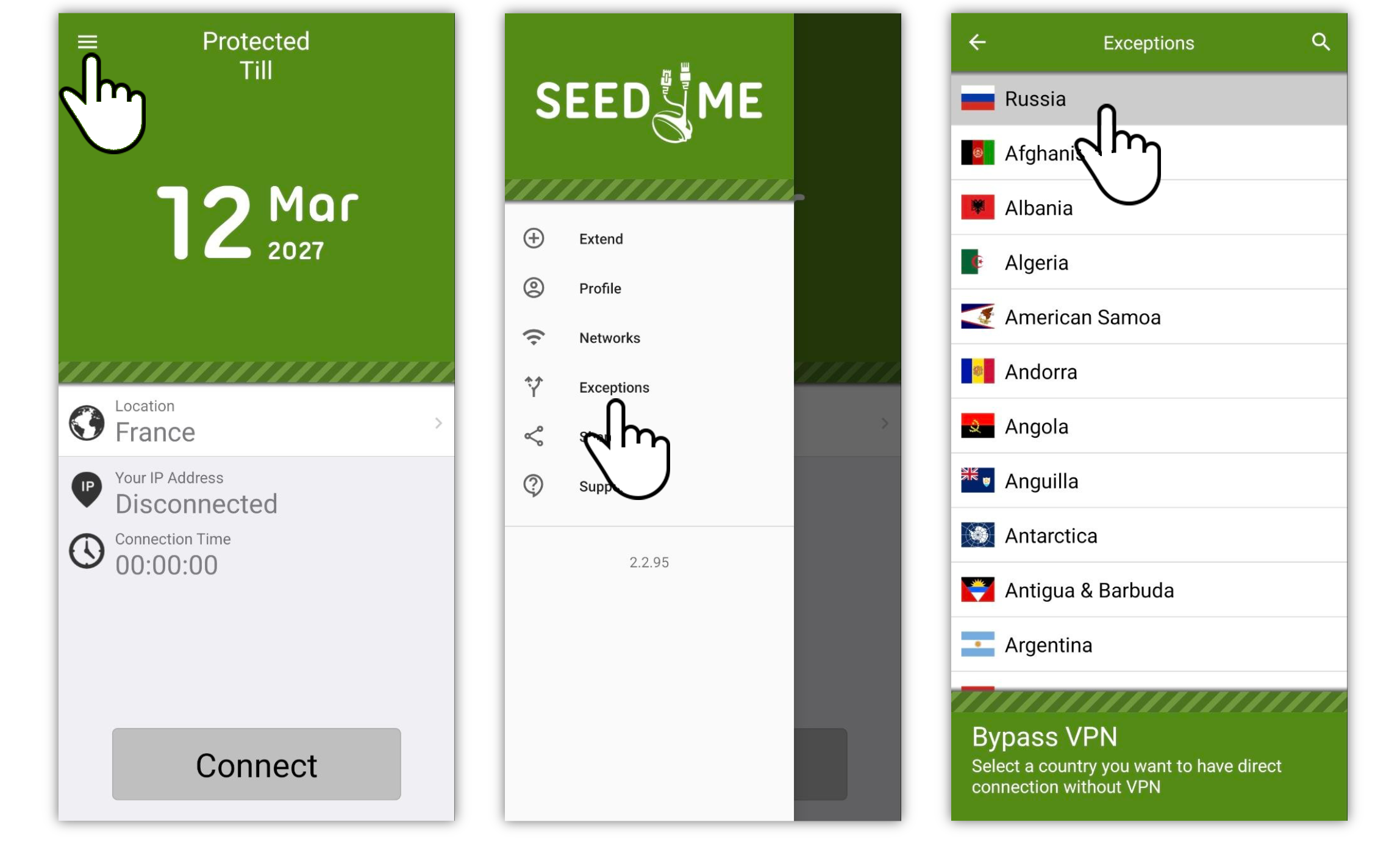
That’s it! Your VPN can remain connected while supported local services use a direct connection.
Update Seed4.Me VPN today and enjoy a more flexible VPN experience.